Why ChatGPT and Claude get spreadsheet totals wrong (and how to get counted answers)
ChatGPT and Claude get a spreadsheet total wrong when they read the rows instead of counting them. That happens in three situations: the table is pasted as text and the model adds it up in its head, the file is too big to read completely, or the model filters the wrong rows (a missed category, a different spelling). When the chat runs real code on a small file, the total is usually right. To get counted answers every time, let something that computes do the math (a formula, a script, or a query tool) and have the AI ask the question.
Is ChatGPT good at math?
At arithmetic in plain text, not reliably. A language model writes the next words of its answer; when it “adds up” a column it is predicting what the sum looks like, not running a sum. On ten rows that prediction is usually right. On thousands it drifts, and nothing in the answer tells you it did.
When ChatGPT or Claude runs code on an uploaded file, the math is done by the code, and it is exact. The risk moves elsewhere: did it load the whole file, and did it filter the right rows?
Four ways an AI gets your total wrong
1. It read a pasted table instead of computing. Finance people who tested this found errors they only caught by checking. Sebastian Stange gave ChatGPT 200 rows of real data: “even the corrected output was still incorrect”, and “I would not have spotted this issue if I had not redone the analysis manually” (Finance Impulse).
2. The errors hide under correct subtotals. In a Wall Street Prep test of AI on a financial model, the model “hallucinated significant portions of historical data”, with “slightly incorrect line items, all adding up to correct subtotals” (write-up). A check on the grand total would not have caught it.
3. The file is too big to read completely. OpenAI’s own help page says a file can upload successfully but still be too large to analyze completely (OpenAI Help). On a forum about data questions, one user writes that with “ones with 5000 rows, it can be tough to get ChatGPT to give you accurate answers” (OpenAI Community).
4. It filtered the wrong rows. A region left out (“You forgot rest of world”, Finance Impulse), “USA” when the sheet says “United States”, or a month boundary off by a day. The arithmetic can be perfect and the total still wrong.
What we measured
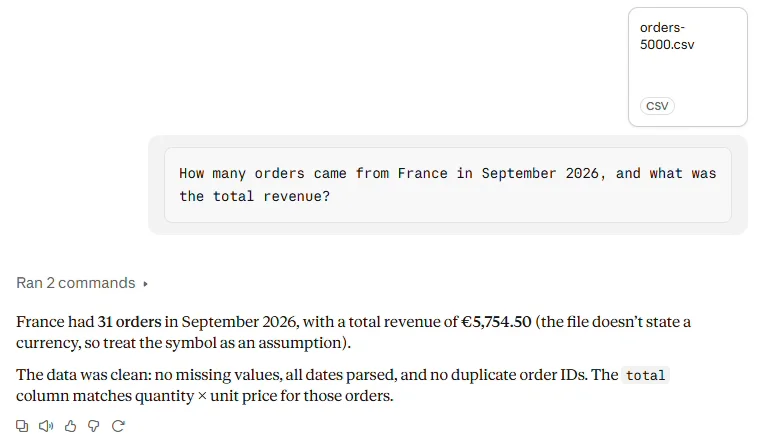
We asked Claude (free plan, Sonnet 5.5) the same question about an orders file: “How many orders came from France in September 2026, and what was the total revenue?” The true answers were computed from the files beforehand.
| File | What we did | Claude’s answer | True answer |
|---|---|---|---|
| 5,000 rows (410 KB) | Uploaded the CSV | 31 orders, €5,754.50 (it ran code) | 31 orders, €5,754.50 |
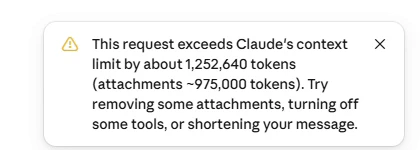
| 50,000 rows (4.1 MB) | Pasted the sheet | No answer: “exceeds Claude’s context limit by about 1,252,640 tokens” | 277 orders, €50,279.50 |
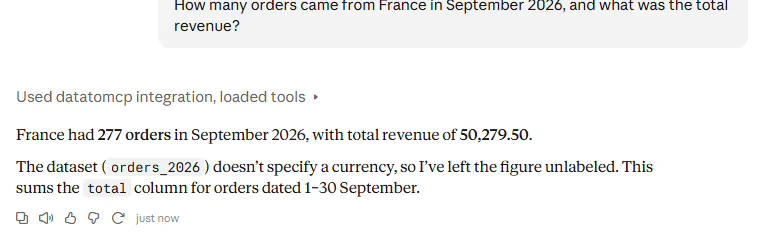
| 50,000 rows | Asked through datatomcp | 277 orders, 50,279.50, in about 25 seconds | 277 orders, €50,279.50 |
So on our file Claude did not guess. On the small file it was exactly right, because it ran code. On the big one it could not answer at all. ChatGPT, logged out, froze the browser tab on the same 50,000-row paste.
How to get counted answers
Pick by how often you ask and how big the sheet is. All three are fair options.
- Ask the AI for a formula, not a number. Give it the header row and a few sample rows, ask for a
SUMIFSor a pivot, and let the sheet compute. Best for one total you will check every month. You still check the formula. - Upload the file and make it run code. Fine for a one-off question on a file that fits. Ask it to show the filter it used and the row count, then check one number against a pivot. The upload is a copy: next month you upload again.
- Connect the sheet to a query tool. The AI sends a question (“orders from France in September, count and sum of total”), a database counts every row, and only the result comes back. Best when the sheet is big, changes often, or several people and agents ask about it. datatomcp is one such tool; the next section shows how it works.
Counted answers with datatomcp
- Import the sheet or CSV. Sign in at app.datatomcp.com and pick a Google Sheet or upload a CSV (up to 100,000 rows on the free plan). The import report flags numbers stored as text and mixed date formats before any question is asked.
- Connect your AI. Add datatomcp as a connector in Claude (steps) or ChatGPT (steps).
- Ask as usual. The AI can look up the real values in a column first (so it filters on “United States”, not “USA”), then asks for the total. The database (DuckDB) counts every row. Each result says how many rows matched, whether anything was cut off, and which version of the data it used.
When the numbers live in several sheets (orders in one, customers in another), link them in one workspace and ask across both. Totals from a linked sheet count each of its rows once, so a target is never added twice, and everyone on the team, with their own AI, gets the same counted answer.
A 30-second check for any AI total
- Ask: “Which filter did you apply, and how many rows matched?” No row count means it didn’t count.
- Check one number against a pivot or a
SUMIFS. - Ask for the breakdown (by region, by month) and see that every category you expect is there.
- Ask the same question in a new chat. A computed total comes back the same; a guessed one can change.
FAQ
Can ChatGPT and Claude read Excel files? Yes. Both accept .xlsx and .csv uploads and can run code on them. Whether the total is right depends on the file fitting and the filter being right, not on the format.
Why did my AI give a different total the second time? Without code, the answer is generated, and generation can vary. A total computed by code or a database is the same every time on the same data.
Is my data sent to the AI with a query tool? Only what the AI asks for. For a total, that is the result, not the rows. datatomcp is read-only: the AI can filter, group and total, but can’t edit the sheet.
Is it free? The free plan covers 3 datasets of up to 100,000 rows and 1,000 queries a day. Pro is $12 or €12 a month.