Audit what your AI agents asked: one record of every question, query and answer
Once several people on a team connect AI agents to the same data, someone will ask: which agent said revenue was up 12%, what did it actually query, and would it say the same today? Chat history doesn’t answer that. It lives in each person’s account, it shows the reply and not the query, and nobody else can see it. An audit trail of agent questions keeps one record for the whole team: every question, from every agent, with the exact query and the data version it read. This guide covers what to record, how to read it, and how to set it up for spreadsheet data.
What to record for every agent question
| Field | Why it matters |
|---|---|
| Time and session | Group the calls of one conversation together |
| Who | The person whose account or API key the agent used |
| Agent | Claude, ChatGPT, Cursor, an n8n workflow, a script |
| Dataset and version | The exact data the answer came from, so it can be reproduced |
| The query | Filters, grouping and metrics, not the prompt the model was given |
| Definitions used | Whether the answer used the team’s approved definition or the agent’s own calculation |
| Result size and time | Rows returned and matched, duration, errors |
Recording the query, not only the chat, is the point. “What was EU revenue in Q3?” can become a dozen different queries. The query is what tells you whether the number is right.
Set it up in datatomcp
There’s nothing to turn on. Every call an agent makes over MCP, and every REST call made with an API key, is recorded in the workspace the dataset belongs to. Open Audit in the app.
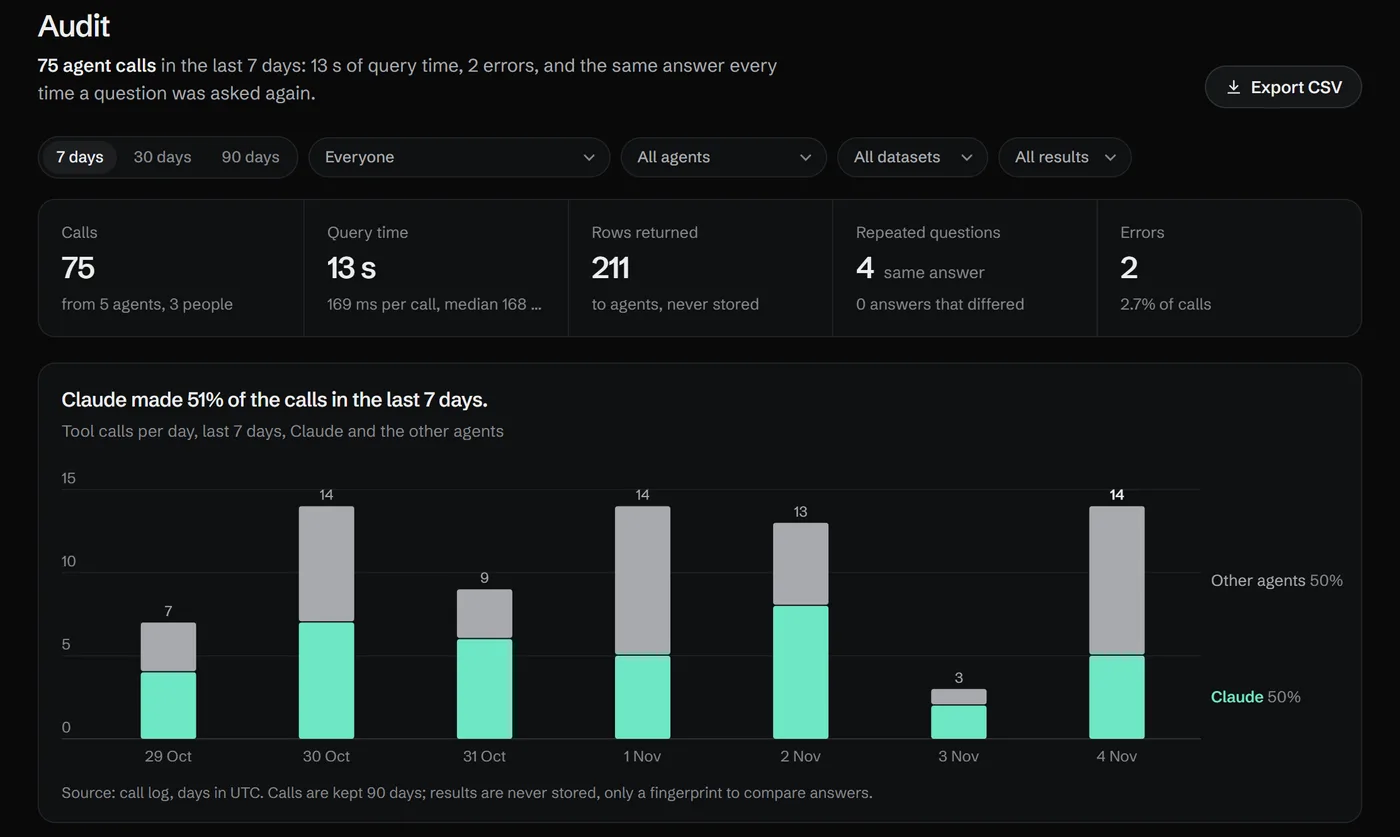
At the top: how many calls, from how many agents and people, how many errors, and whether repeated questions got the same answer. Below: tool calls per day by agent, then the sessions. One session is one agent conversation, with each call’s question in plain words, the dataset and version, rows, time and the definitions it used.
Filter by person, agent, dataset or errors only. Free workspaces keep 30 days, Pro keeps 90.
Read it like a reviewer
Repeated questions. When two calls ask the same question of the same dataset, the audit compares their answers. “Same answer” is what you want. A different answer usually means the data changed between the two calls (a new version after a refresh) or the agents grouped or filtered differently; the version column tells you which.
Calls without a definition. If agents keep computing “sum of amount” themselves, the team hasn’t agreed on what revenue means yet. Save it as a shared definition, and the next calls use it. The Definitions page lists calculations agents ran 3 or more times in 30 days for this reason.
Errors. An unknown column or a timeout shows which datasets confuse agents. Clear column names and a glossary fix most of them.
Unmatched rows. When a query joins a linked dataset (orders to customers), the audit shows how many rows had no match, like an order with a misspelled customer id. Those rows sit under an empty group, and the agent should have mentioned it.
Who uses what. The workspace map draws the same calls as a picture: agents on one side, the definitions they used, the datasets those read.
Export it
Owners and editors can export the audit as a CSV with one row per call: time, session, who, agent, tool, dataset, version, the question, status, error, rows, duration, definitions used, unmatched rows, and whether the answer matched other calls that asked the same thing. Open it in a spreadsheet, keep it with a month-end close, or hand it to whoever reviews how the team uses AI.
What isn’t recorded
- The conversation. The prompt and the model’s reply stay in the AI app. The audit records the queries the agent sent and the size of what came back.
- The returned rows themselves. The record keeps the query and a fingerprint of the answer, enough to compare answers without storing your data twice.
FAQ
Does it record REST calls too? Yes. Calls made with an API key show the key’s name as the agent, so a workflow or a script is as visible as Claude.
Can someone delete entries? No. The audit is read-only in the app. Entries older than the plan’s retention are removed automatically.
Can I limit what an agent sees in the first place? Yes. On the Connect page, each connected agent can be limited to some workspaces, and private datasets are visible only to the people you name. The audit then shows what each agent did within those limits.