Stripe MCP for MRR: ask Claude, ChatGPT or Cursor your exact MRR
To get your exact MRR from Stripe in Claude, ChatGPT or Cursor, have a database add up every subscription under one agreed rule for which statuses count. Stripe’s own MCP server gives an agent Stripe API calls; Stripe’s Dashboard and subscription analytics tools chart MRR; datatomcp imports subscriptions with a read-only key so every agent gets the same number.
This guide shows why “what’s my MRR?” goes wrong when an agent adds it up itself, works one example of 14 subscriptions through datatomcp’s query engine, and sets it up in five steps with a restricted key.
Why the MRR answer depends on how the agent gets it
MRR (monthly recurring revenue) is the monthly value of the subscriptions that are paying now: each subscription’s price × quantity, with yearly plans divided by 12. Simple to say, but an agent answering from raw Stripe data has to get four things right every time:
- Every subscription. Stripe’s list API returns up to 100 objects per call, so a few hundred customers means several calls, and every page has to land in the agent’s context before it can add anything up.
- The status rule. Stripe keeps canceled, expired and trial subscriptions in the same list as paying ones. Which of them count is a choice, and an agent makes it again in every chat.
- Yearly plans. A $790 yearly plan is $65.83 of MRR, not $790.
- Seats. A $25 seat price with 6 seats is $150.
One slip on any of these and the number is off, and nothing in the answer tells you. Two agents, or the same agent on two days, can choose two different status rules. The fix is the same as for any shared number: compute it in one place, from one written-down definition.
Stripe’s MCP server or a data layer: which one you need
| Option | What the agent gets | MRR | Right pick when |
|---|---|---|---|
Stripe’s MCP server (hosted at mcp.stripe.com, OAuth) |
Stripe API calls as tools; what it may do follows the permissions of your restricted key | The agent works it out from the objects it fetches, unless one of Stripe’s listed tools returns it | You want the agent to look up or act on Stripe objects: a customer, an invoice, a payment |
| Stripe Dashboard and Sigma | Charts and reports inside Stripe | Computed by Stripe, shown in Stripe | You check MRR yourself, not through an agent |
| A subscription analytics tool (Baremetrics, ChartMogul and similar) | Dashboards built for subscription metrics | Computed by the tool | You want a full metrics dashboard and its own conventions |
| datatomcp | Your subscriptions as a dataset with an mrr column, queried over MCP or REST |
Summed by the database with an approved definition; every agent gets the same number | You want to ask MRR in Claude, ChatGPT or Cursor next to your other data, with one definition for all of them |
Stripe’s MCP server and datatomcp do different jobs and work side by side: one acts in Stripe, the other answers counted questions about it. Stripe also notes in its repository that the local @stripe/mcp npm package is deprecated in favour of the hosted server.
A worked example: 14 subscriptions
A small software company with three plans: Starter at $29 a month, Pro at $79 a month or $790 a year, and Team at $25 per seat a month. Its Stripe account has 14 subscriptions, imported into datatomcp as they come from the connector (one row each; the mrr column is the connector’s: price × quantity per month).
See all 14 subscriptions
| id | status | product | interval | quantity | mrr | started | canceled_at | cancel at period end |
|---|---|---|---|---|---|---|---|---|
| sub_01 | active | prod_starter | month | 1 | 29 | 2026-06-03 | no | |
| sub_02 | active | prod_starter | month | 1 | 29 | 2026-09-21 | no | |
| sub_03 | active | prod_pro | month | 1 | 79 | 2026-05-11 | no | |
| sub_04 | active | prod_pro | month | 1 | 79 | 2026-08-02 | no | |
| sub_05 | active | prod_pro | year | 1 | 65.83 | 2026-07-15 | no | |
| sub_06 | active | prod_team | month | 4 | 100 | 2026-06-20 | no | |
| sub_07 | active | prod_team | month | 6 | 150 | 2026-10-20 | no | |
| sub_08 | trialing | prod_pro | month | 1 | 79 | 2026-11-06 | no | |
| sub_09 | trialing | prod_starter | month | 1 | 29 | 2026-11-10 | no | |
| sub_10 | past_due | prod_starter | month | 1 | 29 | 2026-07-29 | no | |
| sub_11 | canceled | prod_pro | month | 1 | 79 | 2026-04-18 | 2026-10-28 | no |
| sub_12 | canceled | prod_starter | month | 1 | 29 | 2026-05-02 | 2026-09-15 | no |
| sub_13 | active | prod_pro | month | 1 | 79 | 2026-06-09 | yes | |
| sub_14 | incomplete_expired | prod_starter | month | 1 | 29 | 2026-10-19 | no |
Summing the mrr column of every row gives $884.83. That is not the MRR: it includes two canceled subscriptions, two trials and an expired checkout. Grouped by status:
| status | subscriptions | mrr |
|---|---|---|
| active | 8 | 610.83 |
| past_due | 1 | 29.00 |
| trialing | 2 | 108.00 |
| canceled | 2 | 108.00 |
| incomplete_expired | 1 | 29.00 |
| All rows | 14 | 884.83 |
This company’s rule: MRR counts active and past-due subscriptions (past-due customers are still being billed; trials haven’t paid yet). Saved as a definition, that gives:
| Number | Value | How |
|---|---|---|
| MRR | $639.83 | sum of mrr where status is active or past_due |
| Active subscriptions | 9 | count where status is active or past_due |
| MRR in trial | $108.00 | sum of mrr where status is trialing (2) |
| Churned MRR, 14 Oct to 13 Nov | $79.00 | sum of mrr where canceled_at is in the window (sub_11) |
| New MRR, 14 Oct to 13 Nov | $150.00 | sum of mrr of active subscriptions started in the window (sub_07) |
| MRR set to end | $79.00 | cancel_at_period_end is true (sub_13 still pays until its period ends) |
And MRR by product, with the same definition: Pro $302.83 (4 subscriptions, one of them yearly), Team $250.00 (2, 10 seats), Starter $87.00 (3). The three add up to $639.83.
Every number above is the output of datatomcp’s query engine on these 14 rows, run on 13 Nov 2026 against a local copy of the Stripe list API with these subscriptions. The rule itself (count past-due, leave trials out) is the company’s choice, not a law: what matters is that it is written down once and every agent uses it.
Set it up: Stripe MRR in Claude in five steps
1. Create a restricted key in Stripe. Stripe Dashboard → Developers → API keys → Create restricted key, with Read on Customers, Subscriptions, Invoices, Charges, Products and Prices. datatomcp refuses a secret key (sk_…): it only takes a restricted key (rk_live_… or rk_test_…), and only calls Stripe’s list endpoints, so nothing in Stripe can change.
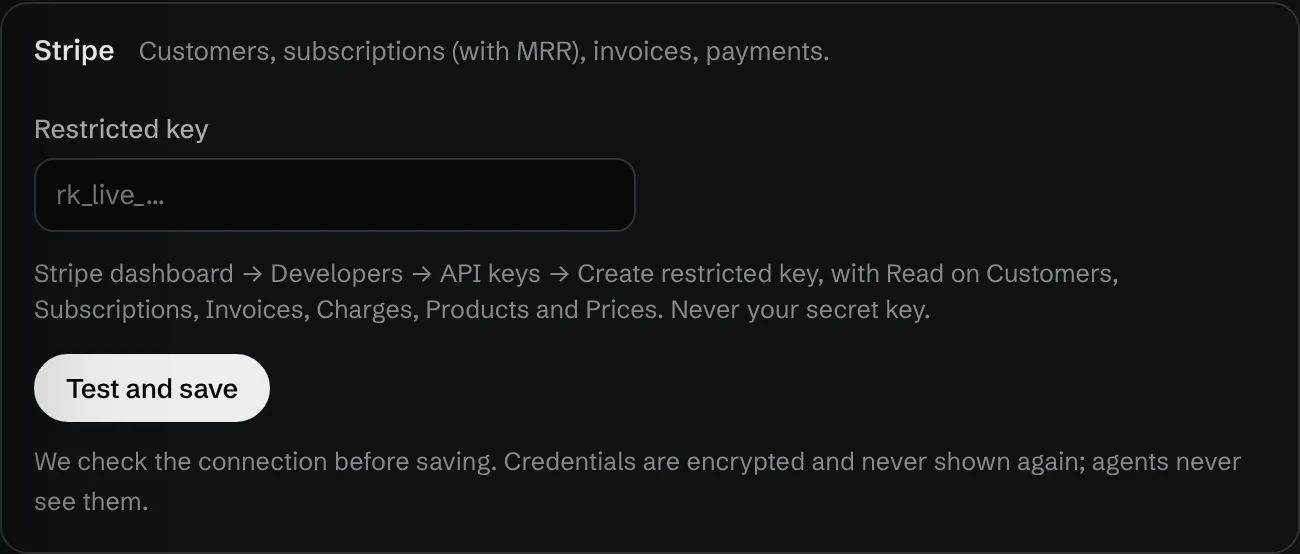
2. Connect Stripe and import Subscriptions. In app.datatomcp.com, open Add data → Connect → Stripe, paste the key and press Test and save. The key is checked before it is saved, stored encrypted and never shown to agents. Then pick Subscriptions (and Customers or Invoices if you want them too). Each becomes a dataset: stripe_subscriptions has one row per subscription with status, product, price, interval, quantity, currency, created, start_date, canceled_at, cancel_at_period_end and mrr. On Pro, connected datasets are re-read every 5 minutes; otherwise press Refresh.
3. Save the MRR definition. In the app, add a definition named mrr: sum of mrr where status is active or past_due, with a description and aliases such as monthly_recurring_revenue. Saved by a person, it is approved under their name. The same over the REST API:
PUT /v1/datasets/{id}/metrics/mrr
{
  "fn": "sum",
  "column": "mrr",
  "where": [{ "column": "status", "op": "in", "value": ["active", "past_due"] }],
  "unit": "USD",
  "description": "MRR at list price: active and past-due subscriptions.",
  "aliases": ["monthly_recurring_revenue"]
}
4. Connect your agent. In Claude Code:
claude mcp add --transport http datatomcp https://app.datatomcp.com/mcpthen /mcp to sign in. For Claude web and desktop, ChatGPT, Cursor and others, the same URL goes where each client takes a remote MCP server.
5. Ask. “What’s our MRR?”, “MRR by product”, “how much MRR churned in the last 30 days?”. The agent asks for the definition by name instead of rebuilding the sum, and the answer says which definition was used and who approved it:
"meta": {
  "rows_counted": 14,
  "metrics": [{ "name": "mrr", "fn": "sum", "column": "mrr", "approved_by": "[email protected]" }]
}
Ask the same question from ChatGPT or Cursor and you get the same $639.83, because the number comes from the same definition on the same data version. More on how definitions work: one definition of revenue across Claude, ChatGPT and Cursor.
What the mrr column counts, and what it doesn’t
- List price.
mrris each item’s price × quantity per month. Coupons and discounts are not subtracted, so a customer on 50% off still counts at full price. If you give many discounts, compare with the invoices dataset (amount_paid). - Usage-based prices count as 0, because a metered price has no fixed amount per month.
- One currency per row. Group by
currencybefore you add up, or keep one Stripe account per currency. - Today’s subscriptions, not their history. The dataset is a snapshot of each subscription as it is now. Churned and new MRR come from
canceled_atandstart_date; upgrades and downgrades within a subscription don’t show as separate events.
Want to see definitions and the audit of agent questions before connecting anything? The demo has an approved revenue definition on sample sheets, no sign-up needed.
FAQ
Does Stripe have an MCP server? Yes. Stripe hosts one at https://mcp.stripe.com with OAuth sign-in. Its tools are Stripe API calls, and what an agent may do follows the permissions of the restricted key. The local @stripe/mcp npm package is deprecated in favour of the hosted server (Stripe’s repository).
Can Stripe’s MCP server calculate MRR? Check Stripe’s tool list for a tool that returns it. Without one, the agent fetches subscriptions and does the arithmetic in the chat, choosing the status rule and the yearly-plan conversion itself. For one exact number across agents, compute it in a database with a saved definition.
How do you calculate MRR? Add up, for every paying subscription, price × quantity per month: monthly plans as they are, yearly plans divided by 12, quarterly plans divided by 3. Decide once whether trials and past-due subscriptions count, and leave out canceled and expired ones.
Can the agent change anything in Stripe through datatomcp? No. datatomcp takes only a restricted key, calls only Stripe’s list endpoints and gives agents read-only access to the imported rows. The key itself never reaches the agent.
Does it work in ChatGPT and Cursor too? Yes. Any client that takes a remote MCP server uses the same URL, and the REST API works from scripts and automation tools. Every one of them gets the same mrr definition.
How fresh is the number? On Pro, connected datasets are re-read every 5 minutes; on Free, press Refresh. Every answer carries the data version it was computed on.
Do trials count as MRR? That’s your call; most teams leave them out until the first payment. Whatever you choose, save it in the definition so every agent applies the same rule.
Create a free account and connect Stripe with a restricted key. Free covers 3 datasets of up to 100,000 rows each; Pro is $12 a month.
More: AI semantic layer: one definition of revenue across Claude, ChatGPT and Cursor · Claude Code MCP: add a remote server · Audit what your AI agents asked